React Admin dashboard by JS Mastery
New tech stacks and dev tools
- graphql-ws
- GraphQL-Codegen - to help with the types of typescripts.
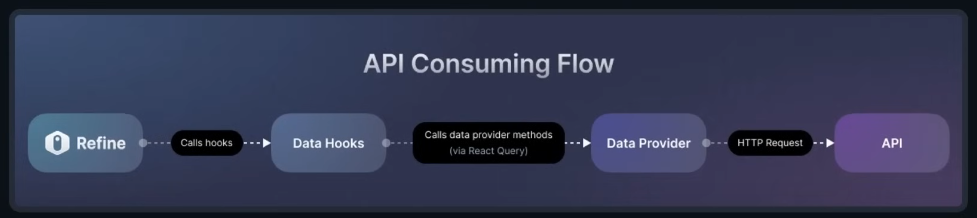
Typical Data Provider workflow in refine
GraphQL Codegen setup
pnpm add -D @graphql-codegen/cli @graphql-codegen/typescript @graphql-codegen/typescript-operations @graphql-codegen/import-types-preset prettier vite-tsconfig-paths
@graphql-codegen/typescript- allow us to generate base typescript operations@graphql-codegen/typescript-operations- plugin for GraphQL Code Generator to generate typings for operations such as queries, subscriptions, and mutations.@graphql-codegen/import-types-preset- top optimize the way types are imported in the generated files.
These 3 (above) packages work together to provide type safety for our entire application with the help of GraphQL schema.
prettier,vite-tsconfig-paths- to create absolute reference for the import statements
Routes for Auth
src/App.tsx
import { Home, ForgotPassword, Login, Register } from "./pages";

function App() {
    return (
        ...
        <Refine ...>
            <Routes>
                <Route index element={<WelcomePage />} />
                <Route index element={<Home />} />
                <Route path="/register" element={<Register />} />
                <Route path="/login" element={<Login />} />
                <Route path="/forgot-password" element={<ForgotPassword />} />
            </Routes>
        </Refine>
        ...
    )
}
Authenticated layout and ThemedLayout V2 by Ant Design
/src/components/layout/index.tsx
import { ThemedHeaderV2, ThemedLayoutV2 } from "@refinedev/antd";
import Header from "./header";

const Layout = ({ children }: React.PropsWithChildren) => {
  return (
    <ThemedLayoutV2
      Header={Header}
      Title={(titleProps) => <ThemedHeaderV2 {...titleProps} text="Refine" />}
    >
      {children}
    </ThemedLayoutV2>
  );
};

export default Layout;
src/App.tsx
import { Home, ForgotPassword, Login, Register } from "./pages";

function App() {
    return (
        ...
        <Refine ...>
            <Routes>
                ...
                <Route
                    element={
                    <Authenticated
                        key="authenticated-layout"
                        fallback={<CatchAllNavigate to="/login" />}
                    >
                        <Layout>
                            <Outlet />
                        </Layout>
                    </Authenticated>
                    }
                >
                    <Route index element={<Home />} />
                </Route>
            </Routes>
        </Refine>
        ...
    )
}
- Authenticated component from refinedevcore abstracts the login functionality for us and automatically tells us if user are authenticated or not.
- if user is not authenticated, the fallback will redirect to /login page
- Outlet is a special component from react-router-dom that render the child's route of the current route - meaning that any route that is child of the current route will be rendred inside of the
<Outlet/>. In this case the homepage is the child of the authenticated